
Connected order updates
Keep customers updated on WhatsApp, automatically.
Orders happen on your website. WhatsApp is how your customers hear back—without you lifting a finger.
✓No separate WhatsApp Business setup to manage—it's built into the same order.
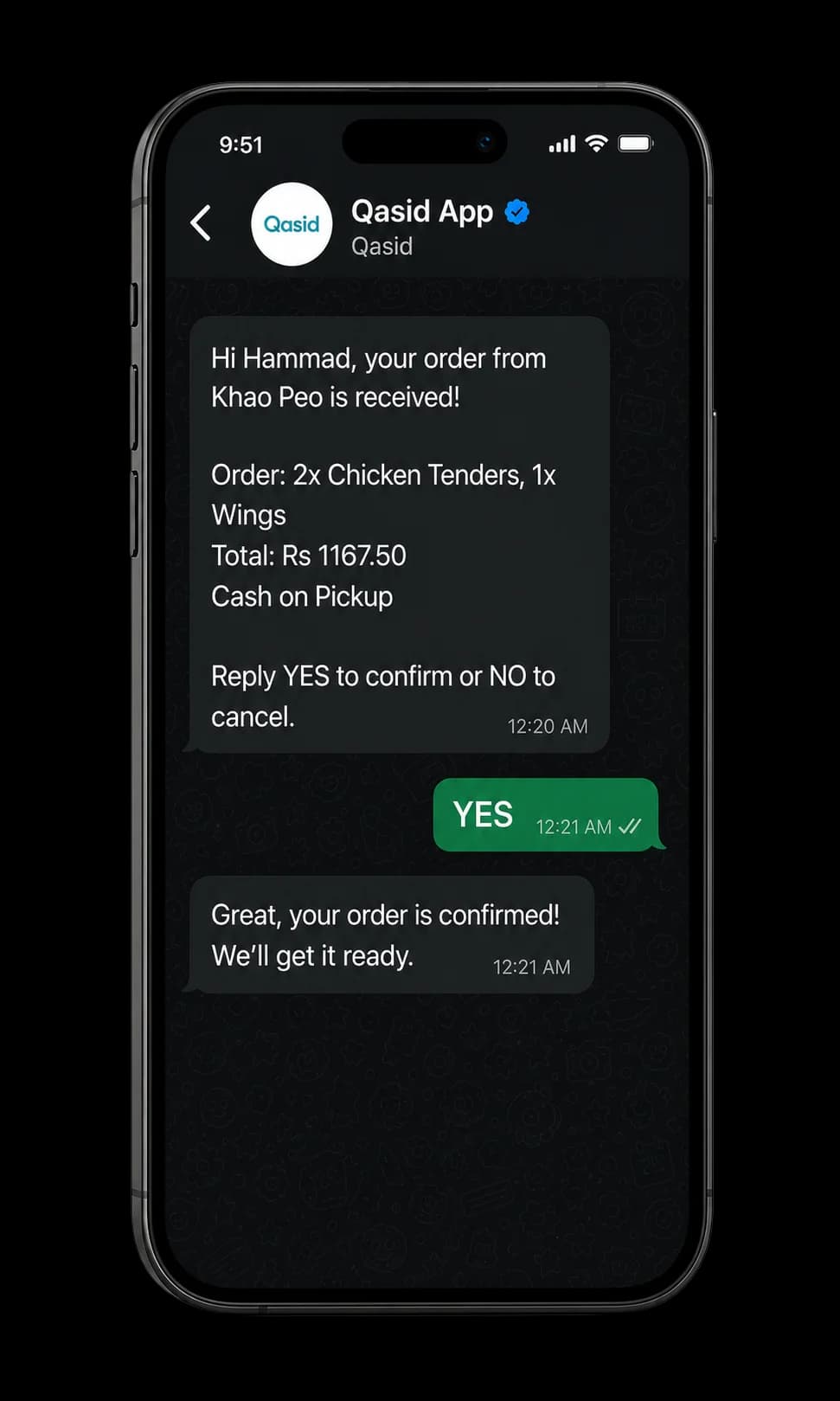
What WhatsApp ordering means with Qasid
Here's exactly what it is.
"WhatsApp ordering" means different things depending on who's selling it. With Qasid, here's exactly what it is: your customer places the order on your Qasid website, and WhatsApp is the channel that keeps them updated as it moves along—order received, being prepared, ready or out for delivery, however you've set up your process.
It is not a separate WhatsApp store or in-chat checkout. The order itself happens on your website; WhatsApp is the connected update layer on top of it. See the full ordering website →
How it actually works
Three steps, none of them manual.
- 1A customer places an order
On your Qasid ordering website.
- 2You see it land in your dashboard
And move it through your normal process.
- 3Your customer receives a WhatsApp message
Confirming the order and letting them know as it progresses.
No separate WhatsApp Business setup to manage, and nothing extra for your customer to do—it's built into the same order.
Why this beats manually texting customers
Nobody has to remember to send it.
Without this, keeping customers informed usually means someone on your team manually messaging or calling to say an order's on its way—easy to forget during a busy shift, and it doesn't scale past a handful of orders at once. Automatic WhatsApp updates mean every customer hears back, every time, without anyone having to remember to send it.
WhatsApp ordering questions
What this feature is—and isn't.
01What is WhatsApp ordering?+
It depends on the provider. With Qasid specifically, it means orders are placed on your website, and WhatsApp is used to send the customer automatic status updates as their order progresses—not a separate WhatsApp-based checkout.
02Can customers browse and buy directly inside WhatsApp?+
Not with Qasid today. Ordering happens on your website; WhatsApp is the update channel connected to it, not a separate storefront inside the chat itself.
03Is there an app to take orders on WhatsApp?+
No app is needed. Orders come through your Qasid website and appear in your dashboard; the WhatsApp updates to your customer are sent automatically from there.
04Do I need a separate WhatsApp Business account?+
No separate setup to manage—the WhatsApp updates are connected to your Qasid order flow directly.
05How do I track orders and their WhatsApp updates?+
From your Qasid dashboard—orders and their status live in one place, and the WhatsApp updates are triggered from the same system as you move an order along.
See it in action
See the order-to-WhatsApp flow with your own menu or catalogue.
Book a demo to see exactly what your customer would receive, from a real order on your own setup.